- 1-807-228-1532
- support@dnb3d.ca
Free shipping on orders over $175
New Products added Daily
Ready to Ship | Seasonal Gifts | Custom Orders
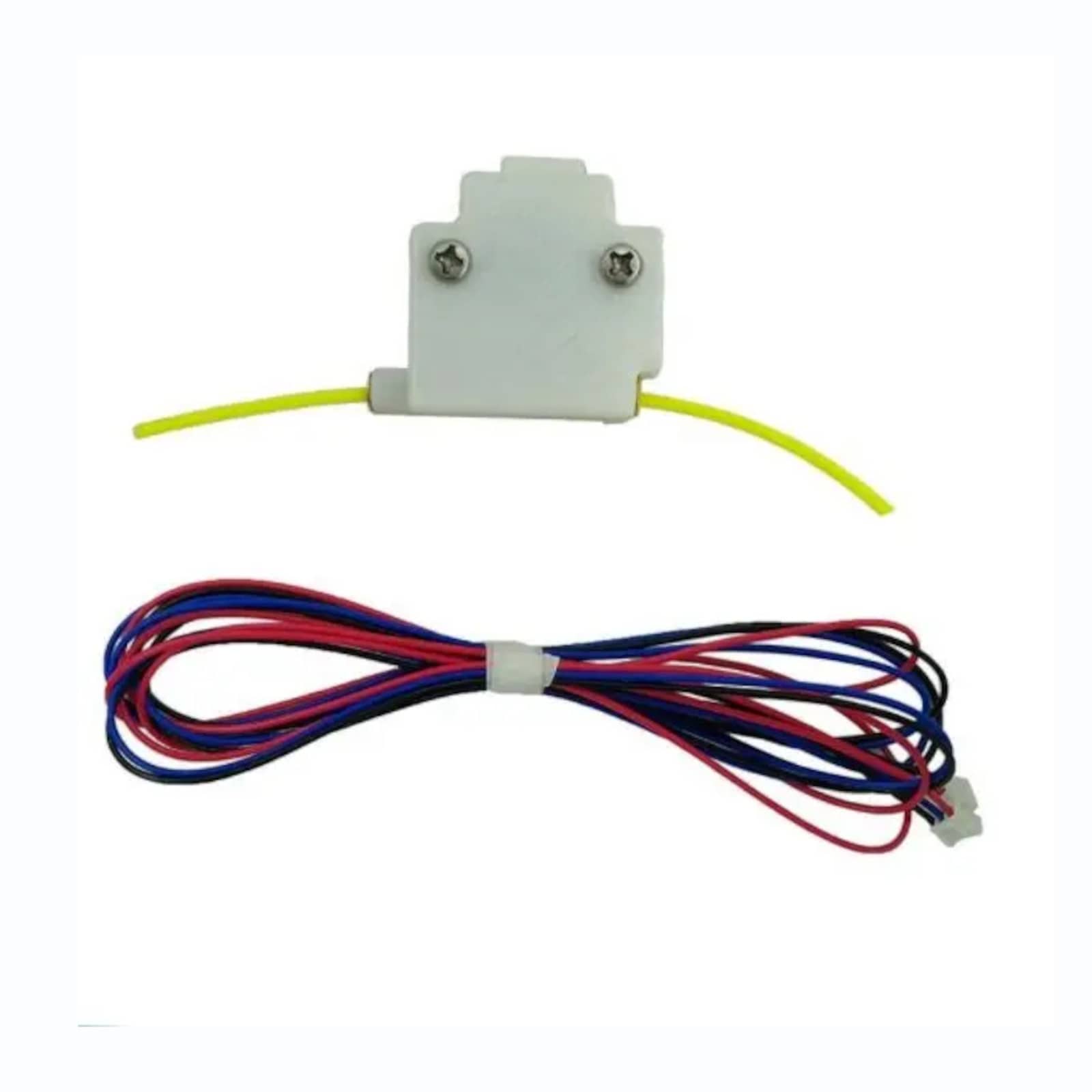
Reliable MKS Filament Runout Sensor for 1.75mm 3D printer filament detection, DIY printer upgrades, printer safety, and failed-print prevention.
$8.00

The MKS Filament Runout Sensor is a compact 3D printer accessory used to detect filament presence in compatible 1.75mm filament systems. It is designed for printer upgrades, DIY 3D printer builds, filament monitoring, and failed-print prevention where the controller board and firmware support filament runout detection.
Your current dnb3D product page lists this sensor with M3 mounting holes, a 3-pin JST-XH2.54 connector, a white ABS plastic housing, and compact 38mm x 30mm x 12.7mm dimensions. It is intended for 3D printers running 1.75mm filament and can be used as part of a properly configured filament runout system.
Filament runout sensors help detect when filament is present or missing before the printer continues printing without material. When supported by the printer firmware, a runout sensor can pause the print, trigger a warning, or allow the user to load new filament before continuing. This can help reduce wasted print time and prevent failed long prints caused by an empty spool.
The sensor includes M3 mounting holes, making it suitable for compatible printed brackets, aluminum extrusion mounts, frame-mounted setups, enclosure mounts, and custom printer accessories. Before installation, confirm that the filament path enters and exits the sensor smoothly without sharp bends or extra drag.
This sensor uses a 3-pin JST-XH2.54 connector. Before wiring the sensor, confirm pinout, voltage, signal type, and firmware configuration for your exact controller board. Different boards and firmware setups may require different wiring orientation or configuration settings.
The sensor body is made from white ABS plastic and measures 38mm x 30mm x 12.7mm. The compact size makes it practical for many 3D printer frames, toolhead-adjacent mounts, spool path guides, or enclosure-mounted filament feed paths.
The MKS Filament Runout Sensor can be used with compatible 3D printer builds, repair projects, printer upgrades, custom filament feed paths, enclosure setups, and controller-board configurations that support filament detection. It is especially useful for long prints, overnight jobs, larger parts, or machines that often run near the end of a spool.
For related components, browse the 3D Printer Parts category or the Electronics category. This sensor can be paired with controller boards, wiring, hotends, extruders, filament path hardware, brackets, and other printer parts from dnb3D.
Filament runout sensors must be wired and configured correctly in the printer firmware before they can pause or alert during printing. For general firmware configuration context, see the Marlin firmware configuration reference.
Every order is hand-inspected and precision-shipped from dnb3D in Marathon, Ontario. Whether you are upgrading a DIY printer, adding filament detection, or replacing a worn sensor, this MKS Filament Runout Sensor provides a practical monitoring component for compatible 1.75mm 3D printer systems.
The MKS Filament Runout Sensor is a compact filament detection accessory for compatible 1.75mm 3D printer systems.
| Product Type | Filament runout sensor / filament detection sensor |
|---|---|
| Filament Diameter | 1.75mm |
| Mounting | M3 mounting holes |
| Connector | 3-pin JST-XH2.54 connector |
| Dimensions | 38mm x 30mm x 12.7mm |
| Material | White ABS plastic |
| Colour | White |
| Common Use | Filament runout detection, filament monitoring, failed-print prevention, printer upgrades, and DIY 3D printer builds |
| Compatible Applications | Compatible 1.75mm 3D printers, controller-board setups, firmware-supported runout detection systems, printer frames, enclosures, and filament path mounts |
| SKU | DB-0711-7596 |
| Installation Warning | Confirm connector pinout, controller-board compatibility, firmware settings, voltage, and filament path alignment before installation. |
| Fulfillment | Hand-inspected and precision-shipped from dnb3D in Marathon, Ontario, Canada |
Before installing the MKS Filament Runout Sensor, confirm that your printer firmware and controller board support filament runout detection. The sensor must be wired and configured correctly before it can pause, warn, or respond during a print.
This sensor uses a 3-pin JST-XH2.54 connector. Confirm the correct pinout for your controller board before connecting the sensor. Do not assume wire order is the same across all boards, cables, or firmware exles.
Use the M3 mounting holes to secure the sensor to a compatible bracket, frame mount, enclosure mount, or printed part. Do not over-tighten mounting screws, as excessive force can damage the ABS housing.
Route filament through the sensor with minimal drag. Avoid sharp bends, poor alignment, tight spool angles, or mounting positions that pull filament sideways through the sensor. A smooth filament path improves detection reliability and reduces feeding resistance.
After installation, manually test the sensor before relying on it for long prints. Confirm that the printer detects filament presence, detects filament removal, and responds correctly according to your firmware settings.
Keep the sensor path clean and free from filament dust, broken filament pieces, oil, loose debris, and plastic shavings. Contamination inside the sensor path may affect smooth feeding or detection reliability.
Route the cable away from belts, pulleys, fans, hotends, heated beds, and moving parts. Use cable clips or strain relief where needed so the connector is not pulled during printer operation.
Every order is hand-inspected before shipping. dnb3D precision-ships filament sensors, electronics, hotend parts, and 3D printer accessories across Canada from our Ontario facility, helping makers, builders, and printer owners receive clean, usable parts ready for careful installation.
At dnb3D, we don’t just ship boxes—we manufacture solutions. Operating our Industry 4.0 micro-factory in Marathon, Ontario, means your order is handled by the same people who design and test these components.
Ready to Ship (3D Printer Parts & Hardware): Finished, inspected, and on the shelf. Dispatched within 1 to 2 business days.
In-House Manufacturing (Laser, Plasma, 3D Prints): These items are manufactured “fresh” to order. Please allow 3 to 5 business days for precision cutting and finishing.
Custom Projects: Bespoke designs require a consultation and a locked-in timeline before production begins.
We ship nationwide across Canada and the USA. Centrally located on the North Shore of Lake Superior, we are uniquely positioned to get your products moving quickly to either coast.
We stand behind every weld, cut, and print. If a product doesn’t meet your expectations, contact the Hub within 30 days. If we wouldn’t put it in our own shop, we won’t let it sit in yours.
Standard Items: Contact us within 30 days for return authorization. Items must be in original, unused condition.
Custom/Personalized Orders: Digitally fabricated to your exact specs (names, custom dimensions, or unique finishes) are final sale once production begins.
Shipping Costs: Return shipping is the responsibility of the customer unless the item arrived damaged or defective.
Have questions about a specific build? Click here to contact the shop.