- 1-807-228-1532
- support@dnb3d.ca
Free shipping on orders over $175
New Products added Daily
Ready to Ship | Seasonal Gifts | Custom Orders
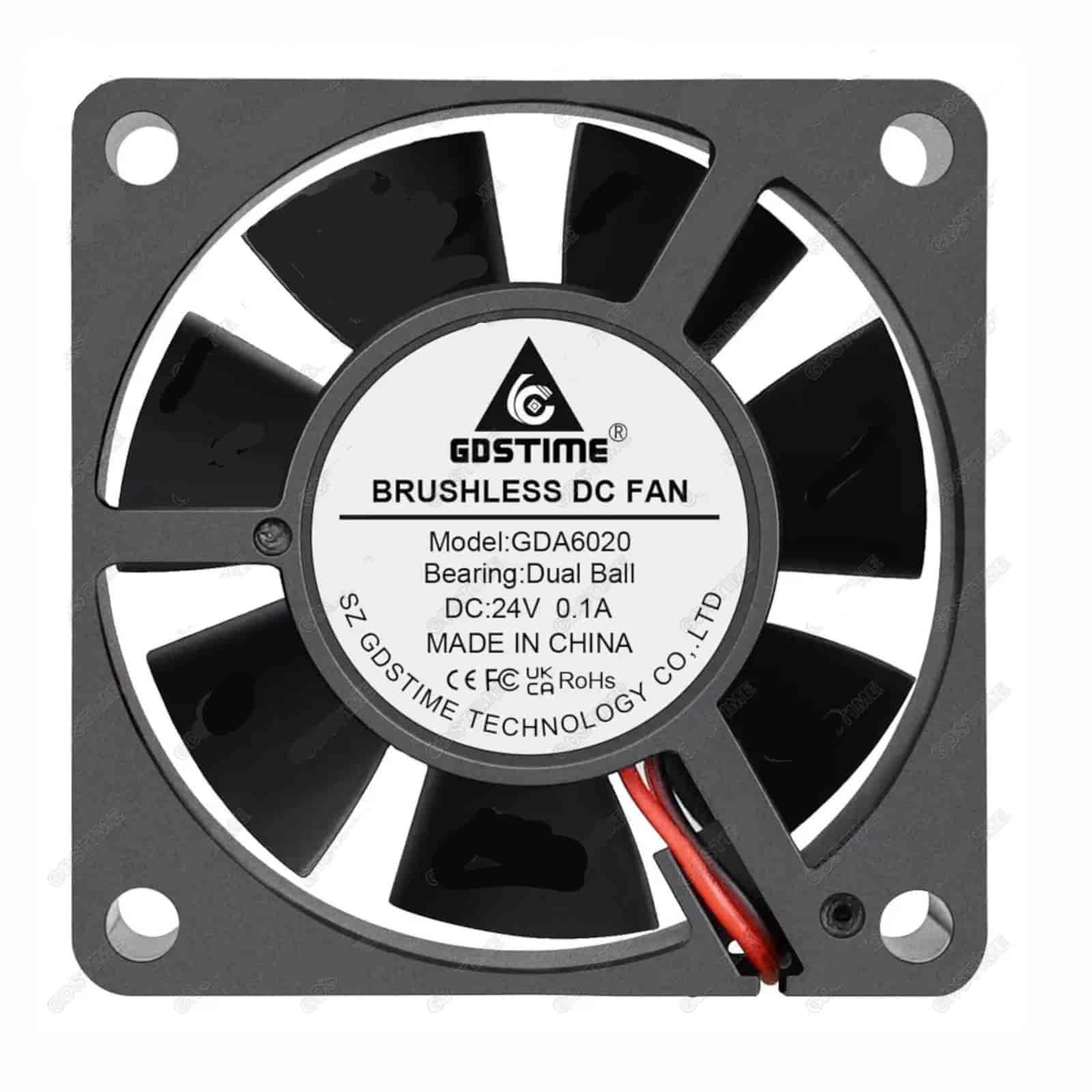
Reliable 6020 24V Axial Cooling Fan for Voron 2.4 electronics bay cooling, 3D printer electronics airflow, control box ventilation, and compact DIY machine cooling applications.
$6.95

The 6020 24V Axial Cooling Fan is a 60mm x 60mm x 20mm cooling fan used for 3D printer electronics bay airflow, control box ventilation, enclosure cooling, and compact machine cooling applications. This product is listed on the dnb3D product page as the GdsTime GDA6020, with 24V operation, 0.1A current, dual ball bearing construction, 25cm lead wires, and a 2-pin JST-XH 2.54 connector.
This fan is especially useful where steady electronics cooling is needed inside a printer electronics bay or enclosed control area. Your current dnb3D product page identifies it as a Voron 2.4 specific part for the electronics cooling bay, with 3 pieces required according to the official BOM.
The 6020 size refers to the fan’s 60mm x 60mm x 20mm frame. Axial fans move air straight through the fan body, making them useful for electronics bays, control boxes, small enclosures, power supply areas, controller cooling, and printer ventilation. This makes the 6020 24V Axial Cooling Fan a practical choice for electronics cooling where a 60x60x20mm 24V fan is required.
This fan is listed as a Voron 2.4 specific part for the electronics cooling bay. The product page notes that 3 pieces are required according to the official BOM. Electronics bay cooling helps move heat away from controller boards, drivers, power electronics, wiring areas, and enclosed printer compartments. Always confirm your exact Voron revision, printed mounts, fan orientation, connector requirements, and wiring path before installation.
The fan is rated for 24V operation and includes 25cm lead wires with a 2-pin JST-XH 2.54 connector. Before installation, confirm fan output voltage, connector fit, wire polarity, controller-board pinout, and firmware fan settings. Connecting a 24V fan to the wrong voltage or wiring it incorrectly can damage the fan or electronics.
The GdsTime GDA6020 is listed with dual ball bearing construction and a 50,000 hour life rating. Ball bearing fans are commonly preferred for printer electronics and machine cooling because they can support continuous use and varied mounting orientations better than many basic sleeve bearing fans.
This fan is listed with a speed of 5000 RPM, airflow of 28.05 CFM, noise level of 35.8 dBA, current draw of 0.1A, and air pressure of 0.26. These specs make it a strong compact electronics cooling option for printer designs and machine enclosures that call for a 6020 24V axial fan.
Although this fan is listed for Voron 2.4 electronics bay cooling, it may also be suitable for other compatible 3D printer electronics bays, control boxes, small enclosures, cabinet airflow, power supply ventilation, and low-voltage machine cooling applications that require a 60mm x 60mm x 20mm 24V axial fan. Always confirm fitment, airflow direction, electrical requirements, and wiring compatibility before installation.
For related components, browse the 3D Printer Parts category or the Electronics category. This cooling fan can be paired with controller boards, wiring, connectors, toolhead electronics, power supplies, fan mounts, and other cooling hardware from dnb3D.
For printer build reference and part compatibility context, review the Voron Design documentation or the Voron 2.4 GitHub reference for your specific electronics bay cooling configuration.
Every order is hand-inspected and precision-shipped from dnb3D in Marathon, Ontario. Whether you are replacing Voron 2.4 electronics bay fans, building a custom printer enclosure, or cooling compact electronics, this 6020 24V Axial Cooling Fan provides a practical airflow option for compatible 24V systems.
The 6020 24V Axial Cooling Fan is a compact GdsTime GDA6020 fan for compatible Voron 2.4 electronics bay cooling, 3D printer electronics airflow, control box ventilation, and compact machine cooling applications.
| Product Type | Axial cooling fan / electronics cooling fan / 3D printer electronics bay fan |
|---|---|
| Brand / Model | GdsTime GDA6020 |
| Fan Class | 6020 axial fan |
| Fan Size | 60mm x 60mm x 20mm |
| Voltage Rating | 24V |
| Current | 0.1A |
| Speed | 5000 RPM |
| Airflow | 28.05 CFM |
| Air Pressure | 0.26 |
| Noise Level | 35.8 dBA |
| Bearing Type | Dual ball bearing |
| Fan Type | Axial cooling fan |
| Cable Length | 25cm lead wires |
| Connector | 2-pin JST-XH 2.54 connector |
| Life Rating | 50,000 hours |
| Common Printer Fitment | Voron 2.4 electronics cooling bay |
| Quantity Note | Voron 2.4 electronics cooling bay use requires 3 pieces according to the official BOM |
| Common Applications | 3D printer electronics cooling, Voron 2.4 electronics bay cooling, controller cooling, enclosure airflow, control box ventilation, power supply area cooling, and DIY machine cooling |
| SKU | DB-0696-7525 |
| Installation Warning | Confirm 24V fan output, connector polarity, mounting size, airflow direction, cable length, connector requirements, and controller compatibility before installation. |
| Fulfillment | Hand-inspected and precision-shipped from dnb3D in Marathon, Ontario, Canada |
Before installing the 6020 24V Axial Cooling Fan, confirm that your printer electronics bay, control box, enclosure, or cooling project requires a 60mm x 60mm x 20mm 24V axial fan. Do not connect a 24V fan to the wrong voltage output or an incompatible controller circuit.
This fan is listed with 25cm lead wires and a 2-pin JST-XH 2.54 connector. Confirm connector fit, wire polarity, and controller-board pinout before powering the fan. Reversed polarity or incorrect wiring can prevent operation or damage electronics.
This fan is listed for the Voron 2.4 electronics cooling bay, with 3 pieces required according to the official BOM. Confirm your exact Voron revision, printed mount, electronics bay layout, screw clearance, connector routing, and airflow direction before installation.
Use appropriate mounting screws and avoid over-tightening. Small fan frames can warp if compressed too hard, which may cause blade rubbing, vibration, extra noise, reduced airflow, or shortened fan life.
Make sure wires, zip ties, loose hardware, printed mount edges, screws, and debris cannot contact the fan blades. After installation, spin the fan gently by hand and check that the blades rotate freely before powering the printer or electronics system.
Route the cable away from hot components, power supply terminals, moving parts, belts, pulleys, fan blades, sharp frame edges, and high-current wiring. Use strain relief where needed so the cable and connector are not pulled during operation.
Electronics bay fans can collect dust, plastic strands, and shop debris. Inspect the fan during routine maintenance and clean carefully with power disconnected. Avoid pushing debris into the bearing or damaging the blades.
After installation, test fan operation through the printer interface, controller output, or electronics setup. Confirm that the fan starts reliably, reaches expected speed, moves air in the correct direction, and does not make rubbing or grinding noises.
Every order is hand-inspected before shipping. dnb3D precision-ships cooling fans, electronics, hotend parts, and 3D printer hardware across Canada from our Ontario facility, helping Voron, electronics, and DIY printer builders receive clean, usable parts ready for careful installation.
At dnb3D, we don’t just ship boxes—we manufacture solutions. Operating our Industry 4.0 micro-factory in Marathon, Ontario, means your order is handled by the same people who design and test these components.
Ready to Ship (3D Printer Parts & Hardware): Finished, inspected, and on the shelf. Dispatched within 1 to 2 business days.
In-House Manufacturing (Laser, Plasma, 3D Prints): These items are manufactured “fresh” to order. Please allow 3 to 5 business days for precision cutting and finishing.
Custom Projects: Bespoke designs require a consultation and a locked-in timeline before production begins.
We ship nationwide across Canada and the USA. Centrally located on the North Shore of Lake Superior, we are uniquely positioned to get your products moving quickly to either coast.
We stand behind every weld, cut, and print. If a product doesn’t meet your expectations, contact the Hub within 30 days. If we wouldn’t put it in our own shop, we won’t let it sit in yours.
Standard Items: Contact us within 30 days for return authorization. Items must be in original, unused condition.
Custom/Personalized Orders: Digitally fabricated to your exact specs (names, custom dimensions, or unique finishes) are final sale once production begins.
Shipping Costs: Return shipping is the responsibility of the customer unless the item arrived damaged or defective.
Have questions about a specific build? Click here to contact the shop.